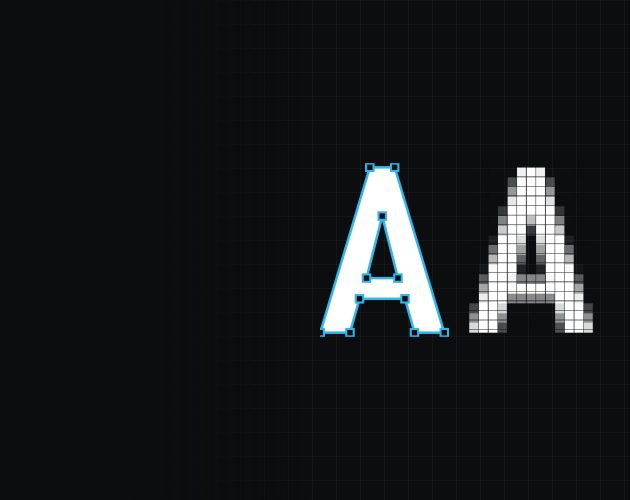
Vector vs Raster: What’s the Difference and Why Does It Matter?
Every image file you have ever opened is one of two things: vector or raster. Most people go their whole lives without needing to know the difference. But the moment you want something printed, cut or made, it becomes the single most important thing about your file.
Here is what each one actually is, and why the difference matters more than file size, file name or anything else.
Vector: a drawing made of maths
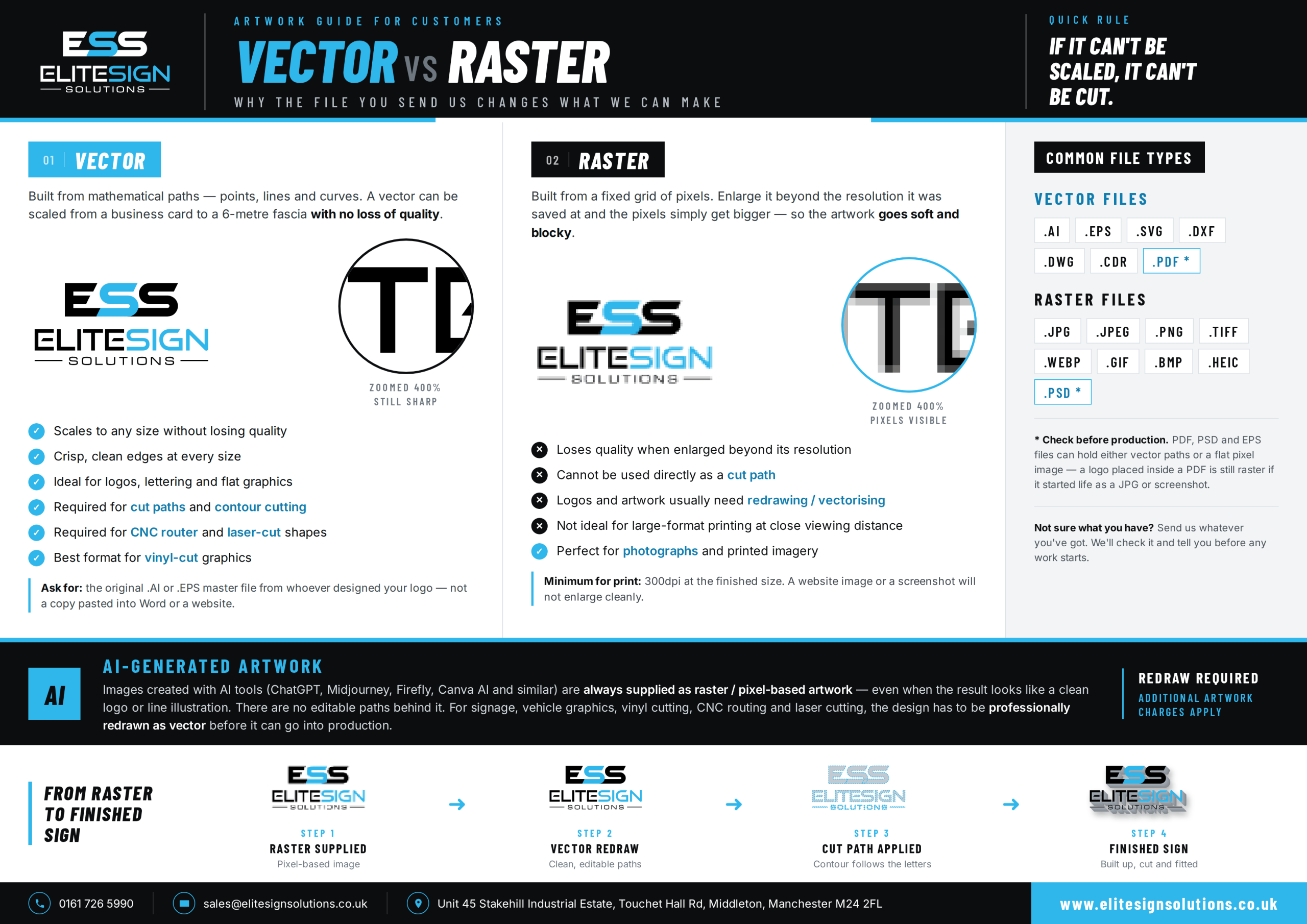
A vector file does not store a picture. It stores instructions: points, lines and curves that describe the shapes. When you open the file, your computer redraws those shapes from scratch at whatever size you ask for.
That is the magic of it. Because nothing is fixed, nothing degrades. The same file can be redrawn perfectly at the size of a postage stamp or the side of a building. Zoom in as far as you like and the edges stay razor sharp.
There is a second benefit that gets less attention: those paths are also physical instructions. A vinyl plotter, CNC router or laser cutter follows a line, and a vector file provides that exact line. This is why vector artwork is not just preferred but required for anything that gets cut rather than printed, from vinyl graphics and vehicle livery to flat cut letters and built up 3D letters, where the letter shapes are formed directly from the vector outline.
Common vector formats: .AI, .EPS, .SVG, .DXF, .DWG, .CDR
Raster: a grid of pixels
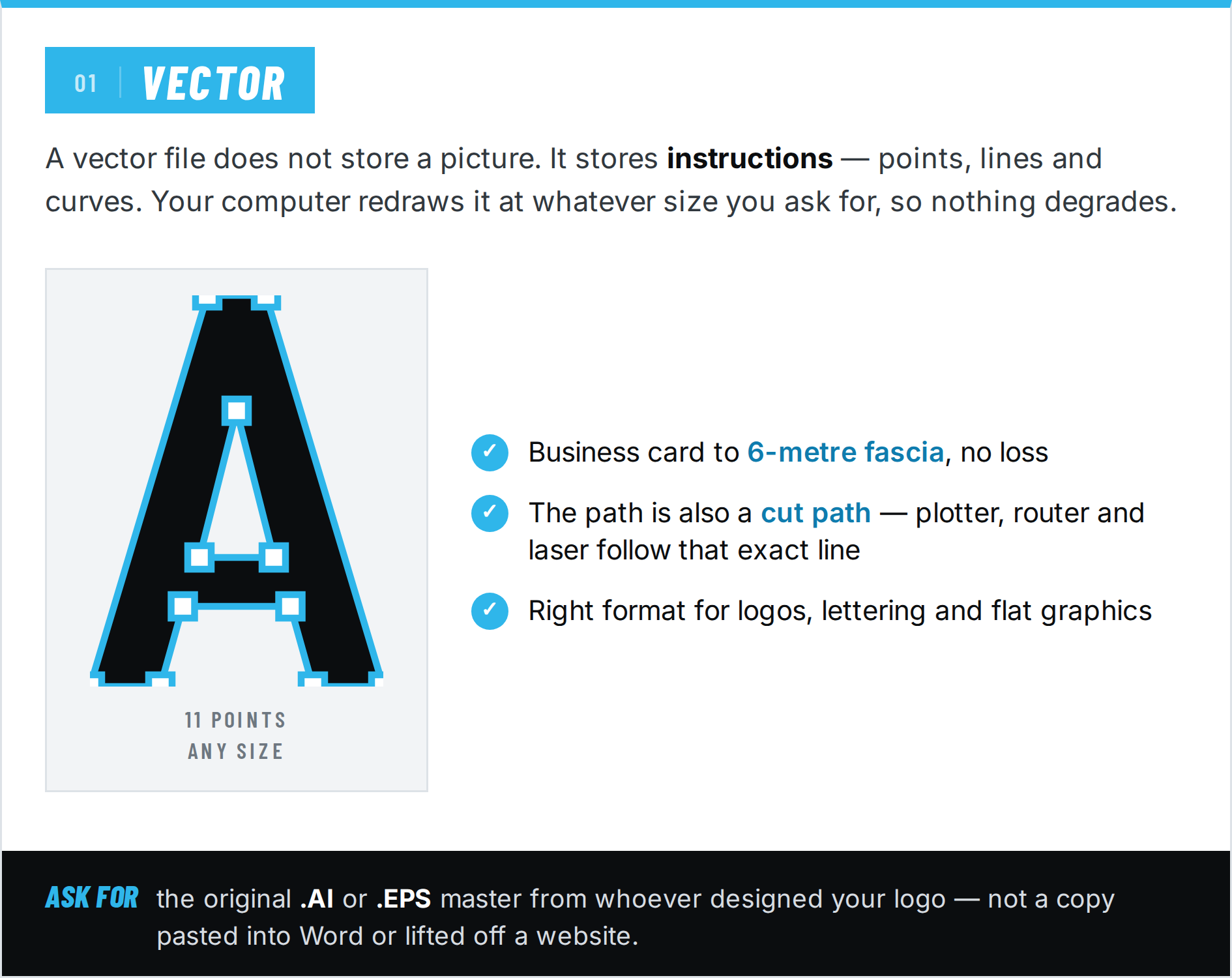
A raster file is a mosaic. It divides the image into a grid of tiny squares called pixels and records the colour of each one. A photo from your phone might be a grid of 4,000 by 3,000 pixels, which sounds like a lot, and for a photo it is.
The limitation is baked in: the grid is fixed at the moment the file is saved. Enlarge the image and you do not get more detail, you just get bigger squares. Edges that looked crisp turn soft and stepped. This is why a logo pulled off a website looks fine on screen but falls apart when someone tries to use it for large format printing at a metre wide.
None of this makes raster bad. It is the right format for photographs and anything with continuous tones, textures and gradients, which is exactly what vectors are poor at. Printed wallpapers and office wall graphics are a good example: they are usually photographic or textured images, so they are raster by nature, and what matters is having enough resolution for the wall size rather than having paths.
Common raster formats: .JPG, .JPEG, .PNG, .TIFF, .WEBP, .GIF, .BMP, .HEIC
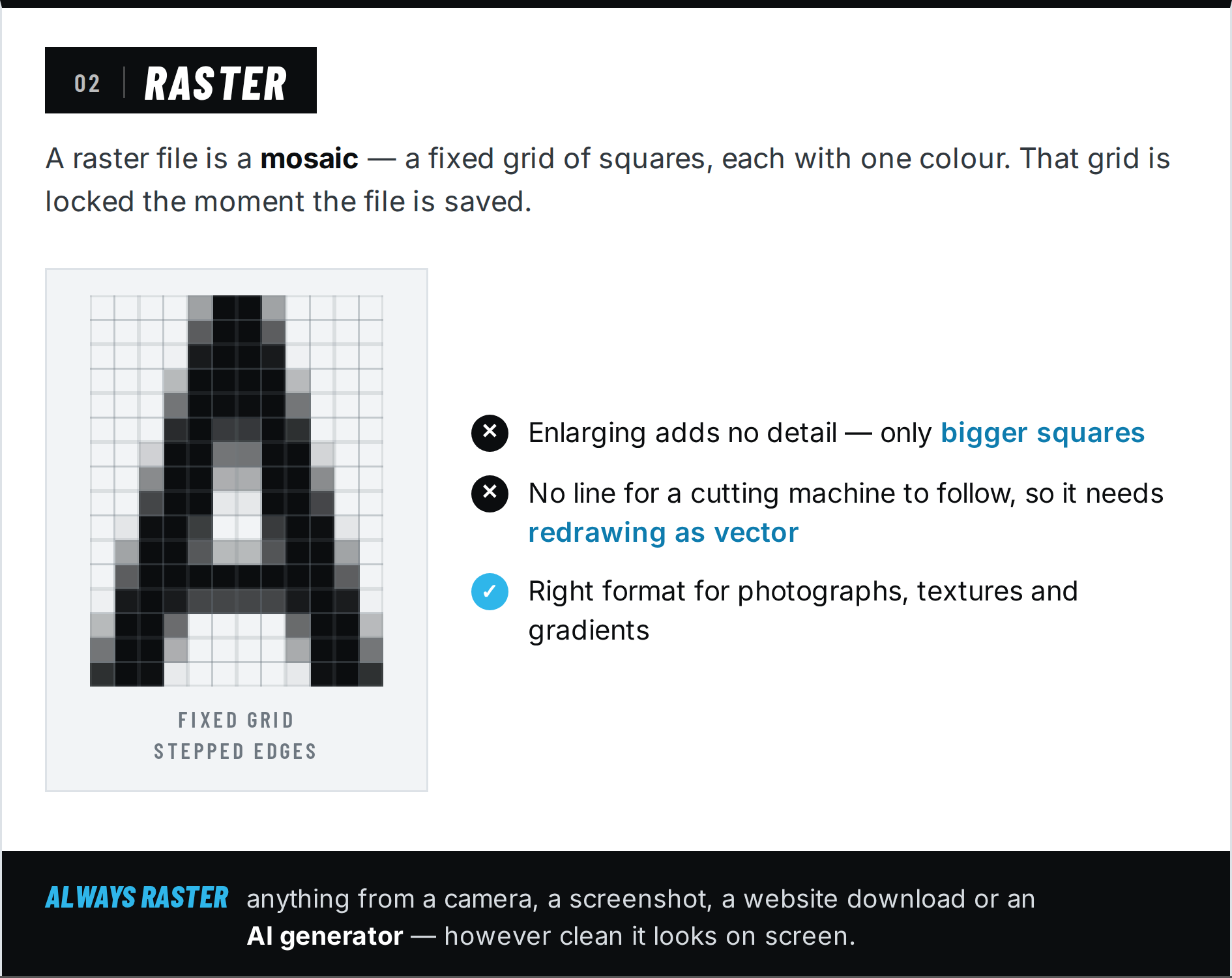
The simplest way to remember it
Vector is a recipe, raster is the finished cake. You can scale a recipe up to feed a hundred people and it works perfectly. You cannot stretch a finished cake to twice its size without it falling apart.
The PDF trap
Here is where most confusion comes from: some file types can contain either.
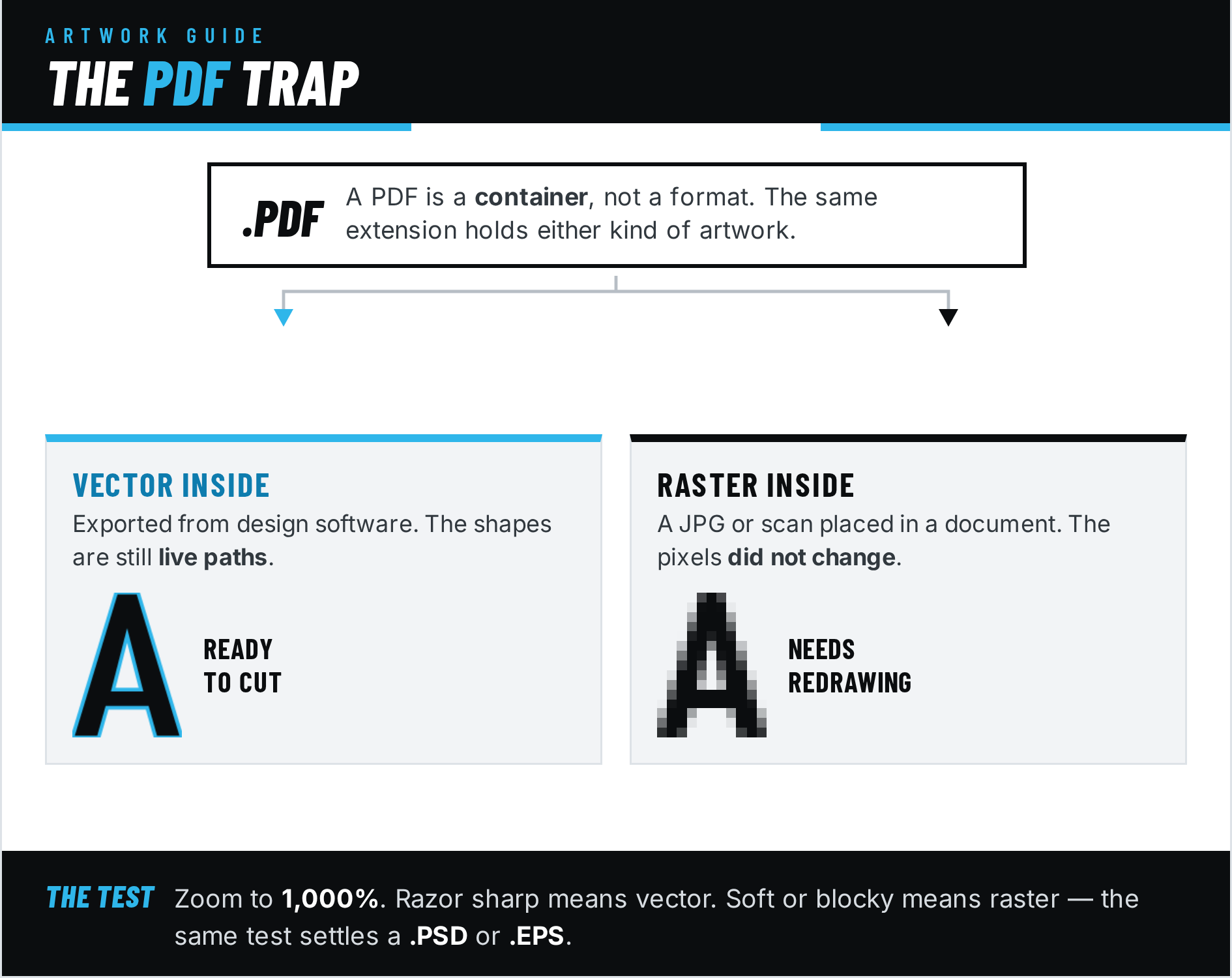
A PDF is a container. If it was exported from design software like Illustrator, the artwork inside is probably vector. If someone placed a JPG into a document and saved it as a PDF, the artwork is still raster. The file extension changed, the pixels did not. The same is true of .PSD and .EPS files.
So “it’s a PDF” tells you nothing on its own. The only way to know is to open it and zoom right in. If the edges stay sharp at 1,000 percent, it is vector. If they go blurry or blocky, it is raster.
Where AI images fit in
Every image made by an AI generator, whether that is ChatGPT, Midjourney, Adobe Firefly or Canva AI, is raster. The tools output a grid of pixels, always, even when the result looks like a clean flat logo or a simple line illustration. There are no paths behind the image, because the AI never drew any. It generated pixels that look like a drawing.
This matters because AI images look deceptively production ready. A crisp AI generated logo on your screen has exactly the same limitation as a photo: it cannot be scaled up cleanly and it contains no line for a cutting machine to follow. If an AI generated design is heading for print or signage, it needs redrawing as vector first. That is a genuine design job done by a person, which is worth knowing before you plan a project around a generated image.
Quick reference
Vector is for: logos, lettering, icons, anything that gets cut (vinyl, CNC, laser), anything that needs to scale.
Raster is for: photographs, digital painting, screenshots, complex textures and gradients.
Check before trusting: PDF, PSD, EPS. They can hold either.
Always raster: anything from a camera, a screenshot, a website download or an AI generator.
The single most useful file you can own for your own logo is the original vector master, usually a .AI or .EPS from whoever designed it. It is the file every other version can be made from. If you have it, keep it safe. If you are having a logo designed, ask for it specifically.
Elite Sign Solutions is a sign manufacturer based in Middleton, Manchester. If you are ever unsure what kind of file you have, send it over and we will happily take a look.
FAQs
A vector image is stored as mathematical paths that can be redrawn perfectly at any size, so it never loses quality. A raster image is a fixed grid of pixels, so it loses sharpness when enlarged beyond its original resolution.
File type is a strong clue. .AI, .EPS, .SVG, .DXF and .CDR are vector, while .JPG, .PNG, .TIFF and .HEIC are raster. For PDFs, zoom in to 1,000 percent: if the edges stay sharp it is vector, and if they go blurry or blocky it is raster.
Not necessarily. A PDF is a container that can hold either. A PDF exported from design software usually contains vector artwork, but a PDF made from a JPG or a scan is still raster inside.
Always raster. AI image generators output pixels, even when the design looks like a clean logo or line drawing. There are no editable paths in an AI generated image, so it must be redrawn as vector before it can be cut or scaled for signage.
Vinyl plotters, CNC routers and laser cutters follow a line. A vector file contains those lines as paths. A raster file contains only pixels, so there is nothing for the machine to follow until a vector outline is created.
Neither, they do different jobs. Vector is best for logos, lettering and anything that scales or gets cut. Raster is best for photographs and images with complex tones and textures.